Welcome

Welcome to my external memory and information on what I'm currently working on. Here you will find snippets of code, tricks and solutions I, or maybe you, may need to reference.

Feel free to comment your suggestions and any constructive criticisms that you may have.
Showing posts with label unity. Show all posts

Thursday, 20 March 2014

Learning Unity 02: Movement

A Little Frustration

I took a break from this project out of misplaced frustration (and increased work load). What triggered this frustration was a misunderstanding I had about how Unity GameObjects were intended to be used.
I had originally planned to have an inheritance structure between my GameObjects that went GameObject > Mobile > UnitMobile. However, when I went to implement the Interact (movement) action in my Mobile base class I had to create the inheritance. And to my annoyance Unity sealed the GameObject class which means it cannot be inherited. Bummer.
Coming back to the project several weeks later I decided to rework my design which led me to, at first, implementing a MobileInterfce interface which UnitMobile, extending MonoBehaviour, would implement. This had the benefit that MobileInterface could not be instantiated itself and would force UnitMobile to implement all methods that are necessary for it to work. However, this could lead to code duplication as I implement the Mobile interface for other classes. Then, thanks to a remark from a colleague, the idea of using Abstracts for the Behaviour was created. This satisfies all my requirements better than my original design. It allows me to implement base methods (such as Move) in the Mobile abstract class while requiring the extended class to implement all abstract methods (such as the InteractWith method) which must exist due to coupling between the UnitManager and UnitMobile classes. (I know coupling is usually a bad thing but direct method calls are far cheaper then a message system).
So, in summary, my misunderstanding was that I didn’t know Unity’s intent with the GameObject. Unity intends everything that exists in a scene to be just a GameObject. This means no casting or type checking is needed when working with GameObjects. When you need to interact with the behaviours/components of a GameObject you can get their instances from the GameObject directly. Then these behaviors/components are actually the driving pieces of the system and the game objects themselves are just, in essence, decoration as well as a container for instance objects (scripts and components).

Overview Of Changes

  • I recreated the base scene so I could be sure that it’s easy to to implement the ClickController and Managers.
  • I changed my naming prefix convention for my base empty GameObjects:
    • ~ Managers and Controllers
    • + GameObject, Cameras and Lights
  • Changed my approach to the Mobile/UnitMoible relationship. I now use an Abstract class for Mobile.
  • Added handling for interactions (default right click) into the UnitManager and Mobile classes.
    • The Unit manager will issue an Interact command to all selected UnitMobiles
    • The Unit manager will issue an InteractedWith command to any UnitMobile that was clicked when issuing the command.
  • Implemented a simple Move method in the Mobile class which sets a target to move to.
  • Implemented the FixedUpdate() method which will move toward the set target by looking at it and applying force to to move it forward. It will only do this if target is set and it is not within its set deadzone to that target.
  • I added the GNU Licence to all source files. I chose this specific license because I’d prefer people not to have people make money off of my work without my consent. The intent of this project is for me and others to learn and contribute.
  • Using a Mono profile I changed the coding standards to more conforme to my personal tastes. I included this profile if anyone else likes it and so I don’t have to recreate it if I format my system later.

Specifics

The Abstract Mobile


Here are the two defaults for speed and deadRange. For those, like me, who hate seeing Magic Numbers inside code I will be moving these to a cosntants solution once I find one that I like in Unity. Chances are this will be a manager class that extends MonoBehaviour so I can change the constants from Unity.

We want each mobile to handle an InteractWith action as it needs to exist to satisfy the coupling between the UnitManager UnitMobile

A Move is issued from the UnitManager and simply sets a target for each selected UnitMobile. The actual code that moves the unit is in FixedUpdate.

This is pretty straight forward. If target is set and we’re not too close to it (defined by deadRange) look at it and apply force forward.

UnitMobile


The InteractWith method must be implemented even if it’s just a stub as the UnitManager assumes it exists in all UnitMobiles.

UnitManager


If we have an Interact action (Right Click) tell our selected units and the GameObject that was clicked on.

Calls the Move method of each selected UnitMobile. Note that in the future I see this interaction being abstracted as the UnitMobile will have multiple responses to an Interact action depending on context (such as attack, patrol, repair, etc.)

We first get the UnitMobile compnent of the GameObject. If it did have a UnitMobile component then we call the InteractWith method on it, otherwise its not something we know how to deal with so we don’t do anything with it.

Other Notes

I’ve been thinking about the abstraction layer (mentioned in the note regarding the InteractWithSelectedUnits method mentioned above). My current thoughts are to create a Handler/Message system that is coupled with specific unit types. Then a Unit would subscribe (depending on the type of unit) to any handler that it can perform. The UnitManager would then tell the handlers to pass along the message to a specific UnitMobile and if that instance is subscribed to the handler the message will be passed. This removes the coupling between the UnitMobile and the UnitManager but does create a coupling between these handlers and their specific unit types. I’ll have to sit down and work though a few use cases but in the mean time if anyone who reads this has feedback about it leave it below.

[Update] Next Steps: Simple Pathfinding

The next step is to implement a primitive pathfinding system. I have looked into several boxed versions of AI and Pathfinding implementations as well as the premium NavMesh feature of Unity.
I’m leaning toward implementing this myself for several reasons:
  • I’ll have full control to implement and modify this however I want.
  • It’ll be free.
  • It’ll be fun! And I’ll get to learn a thing or two about Game AI.
Over the next few days I will be researching Game AI both with Unity and in general to get an idea of a good way to implement this. My current thought is to make either an intelligent world (ie. terrain or plane)or an overlapping intelligent mesh that will define accessible paths.

Source

I’ve tagged the source at v0.2 and it can be obtained here: Bitbucket: Unity Strategy Game Development v0.2

Tuesday, 28 January 2014

Learning Unity 01.1: Source Code

Bitbucket

Why keep your source on Bitbucket and not GitHub you might ask. Well that answer is simple; GitHub is a little bit greedy and requires you to pay for private repositories even if you aren't a corporate user. Bitbucket does not and has all the same functionality as GitHub so I keep all my repositories there.

Where?

You can access the Git repository here:
https://bitbucket.org/bbertrim/unity-strategy-game-development/

The code still hasn't been completely cleaned up but it is in a working state. I plan on finishing up my clean up tomorrow and tagging it to match the "Learning Unity 01" post. I will be updating the post with a link to that tag and links to specific files within. I might throw a few screen shots in for flavor as well.

Sunday, 26 January 2014

Learning Unity 01: Unit Selection

Overview

I'm going to talk about the clicking feature I just implemented using Unity as the first step in creating my game. Also code will be made available on my bitbucket account as soon as I get it cleaned up and this project under version control.

[UPDATE]
The source code has been pushed and tagged. You can find the relevant code to this post at: My Bitbucket Repository.

I've also went back through the post and linked to code and added a screen shot of my Logging Manager.

The Design

The Common Approach

Generally the process for capturing clicks and selecting units is described in the following Sequence Diagram (Note: Yes it is not proper UML but you'll get the idea and I've also included some custom annotations):
Sequence Diagram of a Common Selection Implementation
Figure 1: Common Selection Implementation 

Classes we need to code:

  • ClickController:
    • This class inherits from MonoBehaviour. This allows it to make use of the base class's Start, Update, Awake, OnEventMethods, etc. methods which tie us into the main process loop and events in the game. See its scripting reference.
    • Note that Unity does not allow us to instantiate any class extending MonoBehaviour in code. We have to attach them to GameObjects and Unity will handle their initialization. So to keep things simple I would suggest you create a single empty game object to hold all of your instanced MonoBehaviour classes (I call mine ~InstanceManager). This way you don't have scripts attached to random objects (such as your main camera) just because you have to in order to use it.
  • UnitManager: 
    • The UnitManager is created using a singleton design pattern so that we don't have to initialize it ourselves and that there is only ever one instance. (See Wikipedia: Singleton Pattern).
  • Unit
    • This is the MonoBehaviour that will be attached to all of our units. This allows us to add additional capabilities (via methods) and properties (via members) to the Unit such as movement, speed, hitpoints, etc. 

Following the sequence

  1. The user first clicks some where on the screen. The click controller is watching the input on the mouse button and if it is clicked ever clicked...
  2. It uses Unity's SendMessage capabilities to...
  3. Call a handler defined in the Unit class (LeftMouseButton())
  4. The LeftMouseButton method gets and instance of the UnitManager
  5. Calls the SelectUnit method on the instance which adds the unit to a list of selected units

Thoughts

Although the concept behind the process is sound I do find that this approach has a few flaws:
  1. It's does not Separate Concerns well.
    • In order to make project organized, scalable, modular and maintainable having good Separation of Concerns is crucial.
    • When implementing future features, such as multi-select, deselection, group move commands, patrol commands the code will be messy and you'll have to hunt for where exactly a specific feature is implemented since it could be the Unit handling it or the UnitManager.
  2. Performance
    • This method uses the unit it self to pass along the message that it was clicked and is called using a message system instead of a direct call. The compiler may be smart enough to see the 1:1 mapping to another call in the Unit but the use of a SendMessage method is worrisome. Since them method name is passed as a string Reflection will have to be used which is very expensive.
    • (Ties into the Separation of Concerns issue) why does the Unit have to be involved with the selection process? All a unit should be doing is unit-esq stuff such as moving, shooting an dying. It's the responsibility of the unit manage to manage the units so don't waste the CPU cycles calling the unit or confusion of code location.
  3. Potential for duplication of code
    • More then just units will be clicked on and not just units will move so why not have a base type to implement the shared features and just extend it.
  4. Coupling between the Unity Engine and User code.
    • To make code more readable and, even though it's moot in this case, more modular between platforms. An abstraction layer should be at least partially implemented which maps unity and system methods/properties (such as buttons and keycodes) to actions. You should never see methods named LeftClick() or references to KeyCode outside of the mapping or interactions directly with Unity.
  5. Magic Numbers
    • Although its not shown in the diagram I found an excessive use of constants inside the code, specially with mouse buttons (0=left, 1=right, 2=middle).

My Approach

Magic Numbers and Mapping

I defined two enumerated types to deal with the magic number issues as well as for mapping purposes:
  • MouseButton
    • Values: Left, Right, Middle
  • Action - Maps actions to mouse buttons
    • Values: Select, Interact, Manipulate
Explanation: To begin with the user is going to be able to do three things with units: Select them, Interact with them, and Manipulate them. Now using a mapping method I can define what mouse click will execute which action.

You can see how I handle the mapping in my UnitManager.cs file. The main entry point is at the ClickNotification() method. Following the logic there you can see how the mapping is done with the enumerations which occurs in the MapMouseButtonToActionHandler() method.

Logging

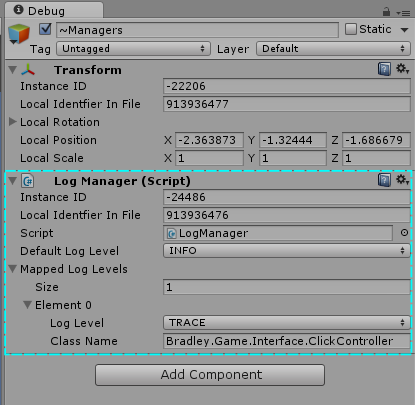
Figure 2: Log Manager Script in the Inspector
Coming from a Java background I found that the lack of logging flexibility within Unity a little frustrating. Specifically adjusting log levels for specific classes. So I wrapped the Unity logger inside my own logging class and am adding this functionality to it.

Figure 3 to the right my Log Manager script attached to my ~Managers object. This allows me to adjust the default log level at run time as well as turn logging on and off for specific classes.

Base Mobile class

Any object that acts like a mobile (can moved, die, etc...) will be derived from this class. Currently this has no impact but will be utilized when I add unit movement.

New Sequence Diagram

My Select Implantation
Figure 3: My Select Implantation
You'll notice that work is being confined to the UnitManager and the ClickController is just notifying the UnitManager that a click occurs and passes along all pertinent information such as the GameObject clicked, location in global space and any key modifiers pressed. Then it's the UnitManager's responsibility to do what it needs to do. This time it checks its mapping for the mouse button pressed (which maps to select) and calls the SelectActionHandler which in turn decides that we're selecting a unit and calls SelectUnit.

At this point I have multi-select, individual selection and deselection and single selection working. But for all of these you'll note that the additional functionality doesn't change the sequence of events, only the actions called at the end. For instance if you are holding Ctrl and click a selected unit the SelectionActionHandler would call DeselectUnit instead of SelectUnit.

Next Steps

Get my code under version control and share it! Then I plan to implement movement and box selections.

Saturday, 25 January 2014

Learning Unity 00: Introduction

What is Unity?

Unity is a game engine and development platform. It comes bundled with Mono Develop as a programming IDE. It has a pretty small learning curve to the point where even those with little to no programming experience can build something with it.

Why learn it?

Well I've had the desire to create a game for 10 or more years now. It all started with Ultima Online and a RunUO powered shard. It was my first taste of crafting a world with programming and I never forgot it. RunUO is a reverse engineered server implementation for Ultima Online which is written in C# and is very easy to modify and extend . Topping that off I have a background in art and I like to write/read fantasy/sci-fi. But most importantly; I'm a programmer with 6 years of training (two diplomas, one in Computer Engineering & Software Development and the other for Computer Analyst) and 4 years of professional experience.

Why Unity?

Mainly because it's free and all the hard work is done for you leaving the fun stuff for me to do. And since the engine it self is maintained by a third party I don't have to support it. I've also looked into other possibilities:

  • OGRE: I used it for a week until I decided it wasn't worth the effort. OGRE is a pretty good rendering engine but you have to create the rest of the game engine yourself and frankly I don't have that much free time.
  • Unreal Engine: Was my second look and I was intrigued but then this project faded from view for a while and I never really gave it too much of a try.
  • Unity: Where I work, Queen's University, they offer a Game Design course in Computer Science. We had a student do placement in my office and he told me about Unity and I was intrigued. I got back into the game design mood and did a lot of research on Unity and there is a lot of documentation to be found and its very easy to get into. My real enjoyment of it came from its scripting which is done in C#, javascript or boo (of course being a java developer and having a lot of experience with C# I chose C#). The scripting in Unity is great, there are absolutely no limits in what you can do and a lot can be done in a very short amount of time.
  • Unreal Engine: This time I took a more serious look at the Unreal Development Kit (UDK) and based on videos and content coming from Epic it's the next Holy Grail. To be honest; the Videos Epic put out showing off its features are mouth watering. However my first twinge of doubt was when they showed off their Kismet Visual Scripting System. Don't get me wrong its pretty damn neat, however, I keep thinking why? When you're writing code you visualize this data in a similar way in your head and can write it 10 times faster then point and clicking in a GUI then connecting inputs and output with a bezier. In the end I came to the conclusion that UDK may be able to generate a prettier game but Unity is just going to be more fun developing in and I feel a lot more flexible with what I can create.
  • Cryengine: All I can say is, “Beautiful”. This engine is absolutely stunning. However it's meant for a 1st/3rd person game and in my initial dive into the game development world I am intending to make a RTS/TBS game. From the examples and videos of RTS games created using Cryengine it just seems to be lacking. Sure the visuals still look nice but it's still, in essence, a first or third person game looking straight down.

Other Plans

I had played around with the idea of doing a video series on Youtube of the development process however I'm not sure who would bother watching it and as such wouldn't be worth the effort. However, if people do end up following this blog and they seem interested I may change my mind.

What's Next?

My first goal is to come up with basic unit selection, management and movement. My next post will detail my design and go over my implementation and my reasons why I did what I did.